
Specify the climate first, the installation format second, and the brightness third. A screen that is correctly cooled will outlast one that is merely brighter.
Four installation formats
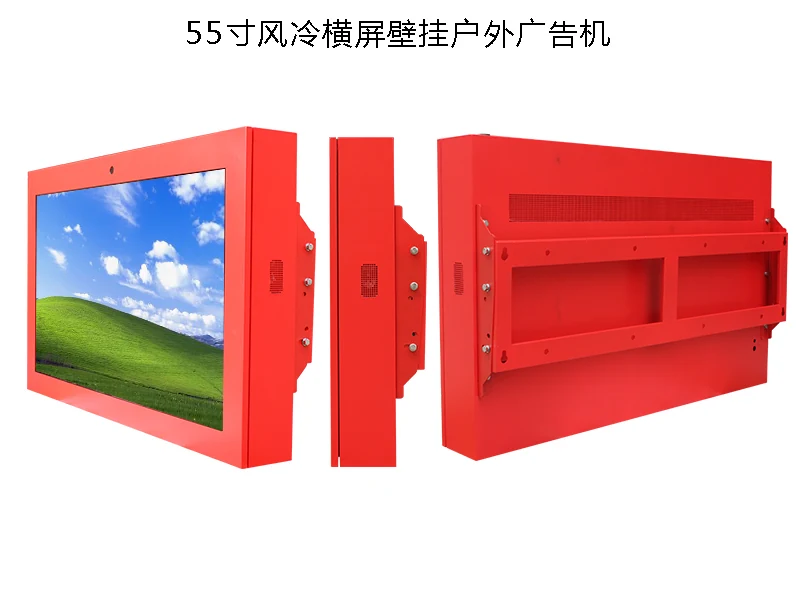
A wall-mounted outdoor display is bolted to a facade, a pillar or a covered wall. It is the most common format and the easiest to protect, because the enclosure can vent through the back of the mounting structure.
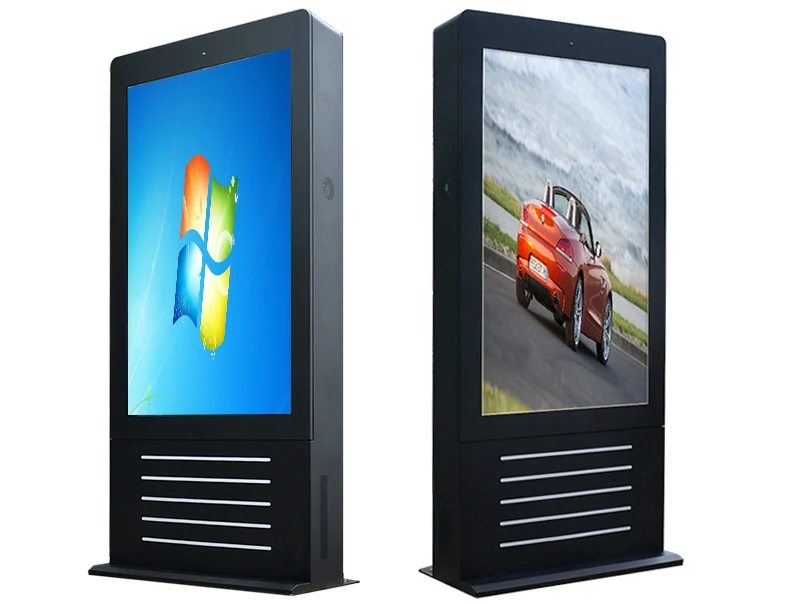
A floor-standing totem stands on the ground and is usually double-sided or single-sided vertical. It suits plazas, forecourts, bus shelters and building entrances, and it needs a service door that a technician can open without closing the site.
A reading board is the horizontal newspaper format used in public squares and transit areas, usually at seated or standing reading height with a protective lip.
An embedded or pillar-mounted configuration is built into architecture, which looks the best and is the least forgiving of thermal mistakes, because the enclosure is constrained by the structure around it. Our outdoor range documents all four formats from 15.6 to 98 inches.
Ingress protection: what IP65 really means
IP65 means dust-tight and protected against water jets from a nozzle at low pressure. IP66 adds protection against stronger jets, such as a hose directed at the enclosure.
Neither rating tells you anything about condensation, salt corrosion or heat. A sealed enclosure in a humid climate will collect moisture inside as the air contracts at night, and the water will sit on the electronics. That is why serious outdoor enclosures use a filtered air path, desiccant or a controlled internal airflow rather than simply sealing the box.
IP54, IP65 and IP66: specify the exposure, not the highest number
IP54 is dust-protected and splash-resistant, so it suits a sheltered position under a canopy where rain never hits the front directly. IP65 is dust-tight and protected against water jets, making it the common baseline for exposed roadside, storefront and building-mounted screens. IP66 adds protection against more powerful jets for harsh coastal or wash-down environments.
Higher is not automatically better. Stronger sealing traps heat and can make an enclosure harder to cool. For most commercial projects, an IP65 front combined with a drained, ventilated or air-conditioned cabinet is more reliable than a sealed IP67 box that overheats in summer.
Thermal strategy by climate
In a temperate climate, filtered fans and a smart controller are usually sufficient. The fan runs when the internal temperature exceeds a threshold, and the same controller can switch on a heater in winter to keep the panel above its minimum operating temperature.
In a hot climate with direct sun, air cooling is often not enough. The internal air temperature can exceed the ambient temperature by 15 to 25 degrees, which pushes the panel beyond its rated range. For large high-brightness panels in these locations, an air-conditioned enclosure is the reliable answer.
For a coastal site, add salt to the calculation. Specify stainless fixings, a marine-grade coating and a shorter inspection interval. Salt spray accelerates corrosion on hinges, screws and vent grilles long before it affects the panel itself.
Ask us before you specify.
Send us the room, the location or the content you plan to run. Our engineers will review it and come back with a practical recommendation — there is no charge for the assessment.
Three cooling architectures compared
Natural convection uses heat sinks and an aluminium chassis without fans or open vents. It is the lowest-maintenance option and preserves the cleanest seal, but it is best suited to moderate brightness, milder climates and enclosures with enough heat-dissipating surface area.
Fan-forced ventilation pulls filtered air through the cabinet under thermostat control. It is effective and economical for high-brightness panels, provided the air path uses labyrinth drainage and the fan status is monitored remotely. A failed fan that nobody notices will cook the display.
Industrial air conditioning maintains a controlled internal temperature for full-sun, high-nit screens in hot climates. The sealed loop protects the IP rating, but it adds purchase cost, continuous power draw and compressor maintenance. Isolating the power supply and control board in a serviceable rear compartment can further reduce heat around the optical assembly.
Brightness and glass
An outdoor screen facing daylight needs significantly more brightness than an indoor one, because the viewer's eye is adapted to the sky. A north-facing covered location may be readable at 1,500 nits; a south-facing unshaded position in a sunny climate may need 3,000 nits or more.
If the screen is behind glass, the glass does most of the damage. Reflections of the sky and of the viewer are superimposed on the image, and no amount of panel brightness removes them. Anti-reflective coated glass, a slight tilt and a recessed mounting position are the practical remedies.
Sun load, optical control and cold-weather protection
Cooling starts by reducing the heat entering the cabinet. Heat-reflective or low-iron glass, an anti-reflective optical stack, a recessed mounting position and a sun hood can block direct solar load without narrowing the viewing angle. A light sensor should lower output at dusk, reducing power, light pollution and unnecessary heat.
Cold climates create the opposite problem. Below roughly -20°C, LCD response can slow and some panels need enclosure heaters and a controlled warm-up sequence before full brightness is available. Specify both the heating and cooling range for the actual site rather than assuming one global outdoor model fits every market.
Power, network and service access
Plan the power supply for the peak load, not the average, and allow for a heater in cold climates and an air conditioner in hot ones. Those two devices can draw more than the display itself.
Network is the other frequent oversight. If the site has no wired connection, specify a 4G or 5G router inside the enclosure and confirm the antenna can see the sky from inside a metal box.
Service access determines whether the screen is repaired in a day or a month. Specify what the technician needs: a door with a lock, a shelf for tools, and enough clearance to remove a panel without closing a pedestrian route.
Content and legibility outdoors
Outdoor legibility is a design problem as much as a hardware one. The viewer is moving, the screen may be several metres away and the ambient light is high. Use large type, few colours, and strong contrast.
Plan for night. A screen that is correctly bright at noon will be painfully bright at midnight, so specify a light sensor and schedule the brightness curve. This also saves power and extends panel life.
Installation details that protect the IP rating
A correctly rated screen can still fail because of the installation. Use sealed cable glands and drip loops so water runs away from connectors instead of through them, and bring power and signal cables in from below. Keep wall penetrations on non-weather faces, seal brackets with outdoor-rated materials and make sure the enclosure can drain condensation without allowing dust or insects inside.
Plan service clearance for filters, fans and electronics. If a technician has to fight the mount or remove the whole screen to inspect a fan, maintenance will be delayed and the seal will eventually be compromised. The installation method is part of the weather protection, not a separate finishing detail.
A pre-purchase checklist
Record the maximum and minimum air temperature, the sun exposure hours, the distance from the sea if the site is coastal, and the nearest viewer distance. Confirm whether the location is covered by a roof or exposed to wind-driven rain. Measure the available depth for the enclosure, including the service clearance.
When you send those details to a supplier, you should receive a specific cooling recommendation rather than a generic one. If a quotation does not mention the thermal strategy, ask for it in writing before you order. Our engineers can prepare that assessment for your site through the contact page.
Maintenance by climate zone
Hot, sunny markets such as the Middle East, South-East Asia, southern Europe and the southern United States are dominated by solar load. Air conditioning or generous fan capacity is often justified, and light-sensor dimming protects the panel during the hottest hours. Temperate climates face more driving rain and humidity, so sealed fronts, drainage and anti-condensation design matter more than maximum cooling. Cold-winter markets need heaters and verified start-up behaviour.
Coastal sites add salt-spray corrosion, so specify marine-grade coatings and stainless fasteners. Dusty or polluted cities shorten filter life and require remote filter-status alerts. A maintenance calendar should cover filter cleaning, fan and temperature monitoring, seal inspection, corrosion checks and fastener re-torque after the first heating season.
How outdoor screens actually fail
Most field failures follow a short list: thermal shutdown at midday, gradual backlight dimming, a blocked or failed fan, water entering through cable glands, condensation inside a sealed cabinet, compressed gaskets after the first hot season, or a power supply mounted in trapped hot air. These are design and maintenance choices, not bad luck.
That is why an IP number alone cannot describe reliability. Ask for the complete thermal strategy, operating temperature range, brightness derating behaviour, service access and warranty terms, then compare them against the site's worst sun, rain and maintenance conditions.
Questions buyers ask us
These are the questions our engineers answer most often about this topic. If yours is not here, send it to us and we will answer it directly.
Is IP65 enough for an outdoor screen?
IP65 covers dust and water jets but says nothing about condensation, salt or heat. A sealed enclosure in a humid climate will collect moisture internally. Look for a filtered air path or a controlled internal airflow.
Do we need air conditioning in a hot climate?
For large high-brightness panels in direct sun, usually yes. Internal air can run 15 to 25 degrees above ambient, which pushes the panel beyond its rated operating range. For smaller screens in shaded locations, smart fans and a heater are often sufficient.
How bright does an outdoor screen need to be?
A covered north-facing position may read well at 1,500 nits. A south-facing unshaded position in a sunny climate often needs 3,000 nits or more. The viewer's eye adapts to the sky, so the requirement is higher than it first appears.
What is the most common outdoor installation mistake?
Forgetting service access. If a technician cannot reach the player, the power supply and the panel without closing the site or hiring a lift, faults stay unfixed. Design the access route at the same time as the enclosure.
Send us your site conditions
Tell us the location, the sun exposure and the climate. We will recommend the enclosure, cooling method and brightness for that specific position.